Wednesday, 5 February 2020

User operating system interface.


User Interface(GUI)

  • A User Interface (UI) enables communication by serving as an interface between an application and its user. 
  • For effective communication, each program, including the operating system, comes with a different UI.
  • The two basic function of an application's user interface is to take the user inputs and deliver the user output. 
  • The types of inputs the UI takes and the types of output the UI provides may vary from application to application.
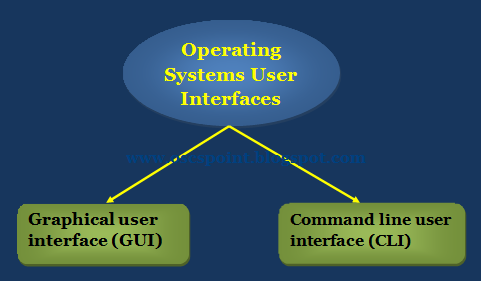
  • A user interface of any operating system can be classified into one of the following types:
  1. Graphical user interface (GUI).
  2. Command line user interface (CLI).

Graphical User Interface(GUI)

  • The graphical user interface is a type of GUI that allows users via point-and-click operations to interact with the operating system. GUI contains many icons representing variables such as a script, directory, and unit.
  • The graphical icon provided in the UI can be manipulated by using a suitable pointing device such as a mouse, trackball, touch screen and light pen. 
  • The other input devices like keyboard can also be used to manipulate these graphical icons. 
  • Users can manipulate the graphical icon provided in the UI using an appropriate pointing tool, such as a mouse, trackball, touch screen, and light pen. 
  • Such graphical symbols can also be controlled with other input devices such as the mouse.

Some advantages of GUI based operating system

  • The GUI interface is easy to understand and even the new users can operate on them on their own.
  • The GUI interface visually identifies and confirms any type of activity that users perform. 
  • For example, if the user deletes a file in the Windows operating system, the operating system demands clarification before deleting it.
  • The GUI interface enables the users to perform a number of tasks at the same time. This features of the operating system are also known as multitasking.

Command Line Interface(CLI)

  • Command line interface is a type of UI that allows users to communicate with the OS by issuing certain specific commands. 
  • You control what's happening in operating systems like DOS and Unix, and in many text-based or character mode programs by typing commands on a command line. 
  • The command line is simply the line where you type the commands on the keyboard. 
  • The only way to control an operating system or a program that uses such a command line interface is to type commands-you don't get menus, dialog boxes or buttons.
  • Both UNIX and MSDOS use interfaces on command line.
  • Command line user interfaces are extremely difficult for new users, because they do not usually list all available commands (which need to be memorized) and any misspelling of a command would prevent it from being executed, often resulting in a confusing error message. 
  • To perform a task within this interface, the user must type a command in the command line. After entering the key the user obtained a command from the command line interpreter.
  • The software program which is responsible for receiving and executing user-issued commands. 
  • The command line interpreter will again display the command prompt along with the output of the previous command provided by the user after the command is processed.
  • The drawback of the CLI is that to communicate with the operating system, the user needs to remember a great deal. 
  • Such types of interface are therefore not known to be very user friendly.

Operating System Services.

  • An Operating System is an interface between a user and computer hardware. An operating system is a software which performs all the basic tasks like file management, memory management, process management, input and output devices management, and much more.
  • Let's discuss about its services in details...


  • Memory management.
  • Process Management.
  • File Management.
  • Program Execution.
  • I/O device Management.
  • Resource allocation.
  • Secondary-Storage Management.
  • Network Management.
  • Error Detection.
  • Protection (User Authentication).

1. Memory Management

  • Memory management is the most important part of an operating system and manages both the primary (known as the main memory) and the secondary memory directly. 
  • Main memory provides the storage for a program which can be directly accessed by the CPU for its exertion. 
  • Therefore, the primary memory management function for a program to be executed is to load the program into main memory.
  • Memory management performs mainly two functions, these are..
  1. Keep track of which part of memory are currently being used and by whom.
  2. Decide which processes should be loaded into memory when the memory space is free.
  3. Allocate and de-allocate memory spaces as and when required.
  • The operating system loads the instructions into the main memory and then picks up those instructions and makes a queue to get CPU time to execute them. 
  • The memory manager monitors which memory locations are open, which are to be allocated or de-allocated.
  • It also makes decisions about which pages to swap between the main memory and the secondary memory. 
  • This operation is referred to as virtual memory management that increases each process's amount of memory available.

2. Process Management

  • In multiprocessing the operating system allows simultaneous running of more than one program (or process). 
  • Process management is a part of an operating system that manages the processes in such a way just to improve system performance.
  • The operating system deals with other types of activities also that includes user programs and system programs like as printer spooling virtual memory, swapping etc.
  • A process is an activity which needs certain resources to fulfill its task. Diverse machine resources include CPU power, main memory, and I / O tools. 
  • Those resources are allocated to the processes and are based on the decision that which process should be designated for resource allocation and this decision is taken by process management applying the algorithms for process scheduling.
  • It should be remembered that a procedure is not a system. A method is only ONE instant of an operating program. A lot of processes run the same program.
  • The five major activities of an operating system in regard to process management are:
  1. Creation and deletion of user and system processes.
  2. Suspension and re-activation of processes.
  3. Process synchronization.
  4. Process communication.
  5. Deadlock handling.

3. File Management

  • A file is a set of related information which its creator defines. Computer can store files on the disk (secondary storage) providing storage for the long term. 
  • Magnetic tape, magnetic disk, and optical disk are some examples of storage media. Each of these media has its own properties, such as speed, power, data transfer rate and method of access.
  • Typically a file system is organized into directories to make its use simple. These directories may include files, as well as other directories. 
  • Each file system consists of analogous directories and sub-directories. Microsoft separates its directories with a back slash and its file names are not case sensitive, while operating systems derived from Unix (including Linux) use the forward slash and its file
  • The main file management activities of an operating system are the creation and deletion of files / folders, file / folders manipulation support, file mapping to secondary storage and file backup.

4. Program Execution

  • The purpose of the computer system is to enable efficient execution of programs by users. The operating system provides an environment in which those programs can be run smoothly to the user. 
  • The user does not have to worry about the allocation or de-allocation of memory or anything else, because the operating system takes care of these things.
  • The program must first be loaded into the RAM to run a program, and then assign CPU time to execute it. 
  • This function is performed by operating system for user convenience. It also performs other significant tasks such as memory allocation and de-allocation, CPU scheduling etc.

5. I/O Device Management

  • Management of input / output device is part of an operating system that provides an environment for improved interaction between system and I / O devices (such as printers, tape drives for scanners, etc.). 
  • The operating system requires certain special programs known as the application driver to communicate efficiently with the I / O machines. 
  • A system driver is a specific type of computer software designed to allow hardware devices to communicate with it. 
  • It usually constitutes an interface for the connection of the hardware to the I / O device, via the actual machine bus or communication subsystem.

6. Resource Allocation

  • In the multitasking environment, when multiple jobs are running at a time, it is the responsibility of an operating system to allocate the required resources (like as CPU, main memory, tape drive or secondary storage etc.) to each process for its better utilization. For this purpose various types of algorithms are implemented such as process scheduling, CPU scheduling, disk scheduling etc.

7. Secondary Storage Management


  • A computer system has multiple storage levels including main storage, secondary storage, and cache storage. 
  • But it is not possible to use primary storage and cache storage as permanent storage because these are volatile memories and their data is lost when power is turned off. 
  • The main memory is too small to accommodate both data and programs. So the computer system has to provide secondary storage for the primary memory backup. Secondary storage involves video tapes, disk drives, and other files.
  • The secondary storage management provides an easy access to the file and folders placed on secondary storage using several disk scheduling algorithms.
  • The four major activities of an operating system in regard to secondary storage management are:
  1. To managing free space available on the secondary-storage device.
  2. Allocation of storage space.
  3. Scheduling the requests for memory access.
  4. Creation and deletion of files.

8. Network Management

  • When multiple computers are in a network or in a distributed architecture, an operating system functions as a network resource manager.
  • Processors communicate with each other through communication lines called network 
  • The design of the communication network must consider routing and network methods, as well as network and security issues.
  • Many of today's networks are focused on configuration of client-servers. 
  • A client is a program running on the local machine requesting the service from a server, while a server is a program running on the remote machine providing customer service by responding to their request.

9. Error Detection

  • Operating system also addresses problems with the hardware. The operating system continuously tracks the system to detect the errors and correct those errors to prevent hardware problems. 
  • The main function of the operating system is to detect the errors on hard disk such as bad sectors, memory overflow and I / O device-related errors. 
  • After the errors are detected, the operating system takes appropriate action to ensure consistent computing.
  • User programs can not handle this service of error detection and error correction, because it involves monitoring the entire process of computing. 
  • Such functions are too important to transfer to consumer systems. If given these privileges, a user program can interfere with the operation of the operating systems in question.

10. Protection (Authentication)

  • Protection is the most demanding feature of an operating system. 
  • Protection is an ability to authenticate the users for an illegal access of data as well as system.
  • Operating system provides various data and network security services through passwords, file permissions, and data encryption. 
  • Computers are generally connected via a network or internet connection, allowing users to share their files and access websites and transfer their files over the network. A high level of security is required for these cases.
  • There are various firewalls for the software at the operating system level. A firewall is setup to allow or deny traffic to a service that runs on top of the operating system. 
  • Therefore by installing the firewall one can deal with running the services, such as telnet or ftp, and not worry about Internet threats because the firewall will reject any traffic trying to connect to the service on that port.
  • If a computer system has multiple users and allows multiple processes to be executed simultaneously, then the different processes must be protected against each other's activities. 
  • Protection refers to mechanism for controlling access to the resources defined by a computer system by programs, processes, or users.


Monday, 3 February 2020

Introduction to Operating Systems

What is an Operating System?

  • Operating system is a system software which is required in order to run application programs and utilities. It perform interaction between application programs and all the hardware of the computer. 
  • Examples of operating system are UNIX, MS-DOS, Windows-NT/2000, OS/2, MS-Windows - 98/XP/Vista, android and Mac OS etc.
www.oscspoint.blogspot.com
Different-2 Operating Systems

  • A computer system has many resources (hardware and software), which are required r to complete different-2 task. 
  • Input / output equipment, memory, file storage space, CPU etc. are the most frequently needed resources. 
  • The operating system serves as manager of the above-mentioned resources and assigns them to specific programs and users whenever appropriate to perform a specific function. 
  • Operating system work as resource manager i.e. it can manage the resource of a computer system internally or externally. The resources are processor, memory, files, and I/O devices. 
  • In simple terms, an operating system work as interface between the user and the hardware/machine.
  • An operating system or OS is a software program that allows the computer hardware to communicate with computer software and work with it. 
  • One computer and software programs would be useless without a computer operating system. The picture shows Microsoft's original packaging for Windows XP.
  • When computers were first introduced, the user used a command line interface to interact with them, which required commands. 
  • But today, almost every computer uses an operating system with a GUI (Graphical User Interface), which is much easier to use and operate.

Examples of Computer Systems

  • Microsoft Windows 10 - PC and IBM compatible operating system. Microsoft Windows is the most common and used operating system.
  • Apple macOS - Apple Mac operating system. Today, the only Apple computer operating system is macOS.
  • iOS - Operating system used with the Apple iPhone and iPads.
  • Chromium - Google operating system used with Chromebooks.
  • Oxygen OS - OnePlus' proprietary operating system.
  • Ubuntu Linux - A popular variant of Linux used with PC and IBM compatible computers.
  • Google Android - Operating system used with Android compatible phones and tablets.

Two views on Operating System


  1. User's View
  2. System View
User View 
  • These systems are designed to monopolize one user's energy, in order to maximize the work the user does. In these cases, the operating system is designed primarily for ease of use, with some attention being paid to performance, and none being paid to use of resources.
System View 
  • A computer system is made up of many resources such as-hardware and software-that have to be handled efficiently. The operating system serves as resource manager, determines between competing demands, manages program execution etc.

Operating System Management Tasks

  • Processor Management which involves putting the tasks into order and pairing them into manageable size before they go to the CPU.
  • Memory Management which coordinates data to and from RAM (random-access memory) and determines the necessity for virtual memory.
  • Device Management which provides interface between connected devices.
  • Storage Management which directs permanent data storage.
  • Application Management which allows standard communication between software and your computer.
  • User interface which allows you to communicate with your computer.

Saturday, 24 February 2018

System Calls

To understand system calls, first one needs to understand the difference between kernel mode and user mode of a CPU. Every modern operating system supports these two modes.

Kernel Mode

  • When CPU is in kernel mode, the code being executed can access any memory address and any hardware resource.
  • Hence kernel mode is a very privileged and powerful mode.
  • If a program crashes in kernel mode, the entire system will be halted.

User Mode

  • When CPU is in user mode, the programs don't have direct access to memory and hardware resources.
  • In user mode, if any program crashes, only that particular program is halted.
  • That means the system will be in a safe state even if a program in user mode crashes.
  • Hence, most programs in an OS run in user mode.

System Call

When a program in user mode requires access to RAM or a hardware resource, it must ask the kernel to provide access to that resource. This is done via something called a system call.
When a program makes a system call, the mode is switched from user mode to kernel mode. This is called a context switch.
Then the kernel provides the resource which the program requested. After that, another context switch happens which results in change of mode from kernel mode back to user mode.
Generally, system calls are made by the user level programs in the following situations:
  • Creating, opening, closing and deleting files in the file system.
  • Creating and managing new processes.
  • Creating a connection in the network, sending and receiving packets.
  • Requesting access to a hardware device, like a mouse or a printer.
In a typical UNIX system, there are around 300 system calls. Some of them which are important ones in this context, are described below.

Fork()

The fork() system call is used to create processes. When a process (a program in execution) makes a fork() call, an exact copy of the process is created. Now there are two processes, one being the parent process and the other being the child process.
The process which called the fork() call is the parent process and the process which is created newly is called the child process. The child process will be exactly the same as the parent. Note that the process state of the parent i.e., the address space, variables, open files etc. is copied into the child process. This means that the parent and child processes have identical but physically different address spaces. The change of values in parent process doesn't affect the child and vice versa is true too.
Both processes start execution from the next line of code i.e., the line after the fork() call. Let's look at an example:
//example.c
#include <stdio.h>
void main() {
   int val;  
   val = fork();  // line A
   printf("%d",val);  // line B
}
When the above example code is executed, when line A is executed, a child process is created. Now both processes start execution from line B. To differentiate between the child process and the parent process, we need to look at the value returned by the fork() call.
The difference is that, in the parent process, fork() returns a value which represents the process ID of the child process. But in the child process, fork() returns the value 0.
This means that according to the above program, the output of parent process will be the process IDof the child process and the output of the child process will be 0.

Exec()

The exec() system call is also used to create processes. But there is one big difference between fork() and exec() calls. The fork() call creates a new process while preserving the parent process. But, an exec() call replaces the address space, text segment, data segment etc. of the current process with the new process.
It means, after an exec() call, only the new process exists. The process which made the system call, wouldn't exist.
There are many flavors of exec() in UNIX, one being exec1() which is shown below as an example:
//example2.c
#include 
void main() {
   execl("/bin/ls", "ls", 0); // line A
   printf("This text won't be printed unless an error occurs in exec().");
} 
As shown above, the first parameter to the execl() function is the address of the program which needs to be executed, in this case, the address of the ls utility in UNIX. Then it is followed by the name of the program which is ls in this case and followed by optional arguments. Then the list should be terminated by a NULL pointer (0).
When the above example is executed, at line A, the ls program is called and executed and the current process is halted. Hence the printf() function is never called since the process has already been halted. The only exception to this is that, if the execl() function causes an error, then the printf()function is executed.

Secondary Storage Structure

Secondary storage devices are those devices whose memory is non volatile, meaning, the stored data will be intact even if the system is turned off. Here are a few things worth noting about secondary storage.
  • Secondary storage is also called auxiliary storage.
  • Secondary storage is less expensive when compared to primary memory like RAMs.
  • The speed of the secondary storage is also lesser than that of primary storage.
  • Hence, the data which is less frequently accessed is kept in the secondary storage.
  • A few examples are magnetic disks, magnetic tapes, removable thumb drives etc.

Magnetic Disk Structure

In modern computers, most of the secondary storage is in the form of magnetic disks. Hence, knowing the structure of a magnetic disk is necessary to understand how the data in the disk is accessed by the computer.
A magnetic disk contains several platters. Each platter is divided into circular shaped tracks. The length of the tracks near the centre is less than the length of the tracks farther from the centre. Each track is further divided into sectors, as shown in the figure.
Tracks of the same distance from centre form a cylinder. A read-write head is used to read data from a sector of the magnetic disk.
The speed of the disk is measured as two parts:
  • Transfer rate: This is the rate at which the data moves from disk to the computer.
  • Random access time: It is the sum of the seek time and rotational latency.
Seek time is the time taken by the arm to move to the required track. Rotational latency is defined as the time taken by the arm to reach the required sector in the track.
Even though the disk is arranged as sectors and tracks physically, the data is logically arranged and addressed as an array of blocks of fixed size. The size of a block can be 512 or 1024 bytes. Each logical block is mapped with a sector on the disk, sequentially. In this way, each sector in the disk will have a logical address.

Disk Scheduling Algorithms

On a typical multiprogramming system, there will usually be multiple disk access requests at any point of time. So those requests must be scheduled to achieve good efficiency. Disk scheduling is similar to process scheduling. Some of the disk scheduling algorithms are described below.

First Come First Serve:

This algorithm performs requests in the same order asked by the system. Let's take an example where the queue has the following requests with cylinder numbers as follows:
98, 183, 37, 122, 14, 124, 65, 67
Assume the head is initially at cylinder 56. The head moves in the given order in the queue i.e., 56→98→183→...→67.

Shortest Seek Time First (SSTF):

Here the position which is closest to the current head position is chosen first. Consider the previous example where disk queue looks like,
98, 183, 37, 122, 14, 124, 65, 67
Assume the head is initially at cylinder 56. The next closest cylinder to 56 is 65, and then the next nearest one is 67, then 3714, so on.

SCAN algorithm:

This algorithm is also called the elevator algorithm because of it's behavior. Here, first the head moves in a direction (say backward) and covers all the requests in the path. Then it moves in the opposite direction and covers the remaining requests in the path. This behavior is similar to that of an elevator. Let's take the previous example,
98, 183, 37, 122, 14, 124, 65, 67
Assume the head is initially at cylinder 56. The head moves in backward direction and accesses 37 and 14. Then it goes in the opposite direction and accesses the cylinders as they come in the path.

Readers writer problem

Readers writer problem
Readers writer problem is another example of a classic synchronization problem. There are many variants of this problem, one of which is examined below.

Problem Statement:

There is a shared resource which should be accessed by multiple processes. There are two types of processes in this context. They are reader and writer. Any number of readers can read from the shared resource simultaneously, but only one writer can write to the shared resource. When a writeris writing data to the resource, no other process can access the resource. A writer cannot write to the resource if there are non zero number of readers accessing the resource.

Solution:

From the above problem statement, it is evident that readers have higher priority than writer. If a writer wants to write to the resource, it must wait until there are no readers currently accessing that resource.
Here, we use one mutex m and a semaphore w. An integer variable read_count is used to maintain the number of readers currently accessing the resource. The variable read_count is initialized to 0. A value of 1 is given initially to m and w.
Instead of having the process to acquire lock on the shared resource, we use the mutex m to make the process to acquire and release lock whenever it is updating the read_count variable.
The code for the writer process looks like this:
while(TRUE) {
   wait(w);
   /*perform the 
write operation */
   signal(w);
}

The code for the reader process looks like this:
while(TRUE) {
   wait(m);   //acquire lock
   read_count++;
   if(read_count == 1)
          wait(w);
   signal(m);  //release lock
   /* perform the 
     reading operation */
   wait(m);   // acquire lock
   read_count--;
   if(read_count == 0)
          signal(w);
   signal(m);  // release lock
} 

Code Explained:

  • As seen above in the code for the writer, the writer just waits on the w semaphore until it gets a chance to write to the resource.
  • After performing the write operation, it increments w so that the next writer can access the resource.
  • On the other hand, in the code for the reader, the lock is acquired whenever the read_count is updated by a process.
  • When a reader wants to access the resource, first it increments the read_count value, then accesses the resource and then decrements the read_count value.
  • The semaphore w is used by the first reader which enters the critical section and the last reader which exits the critical section.
  • The reason for this is, when the first readers enters the critical section, the writer is blocked from the resource. Only new readers can access the resource now.
  • Similarly, when the last reader exits the critical section, it signals the writer using the w semaphore because there are zero readers now and a writer can have the chance to access the resource.

Dining Philosophers Problem

The dining philosophers problem is another classic synchronization problem which is used to evaluate situations where there is a need of allocating multiple resources to multiple processes.

Problem Statement:

Consider there are five philosophers sitting around a circular dining table. The dining table has five chopsticks and a bowl of rice in the middle as shown in the below figure.
At any instant, a philosopher is either eating or thinking. When a philosopher wants to eat, he uses two chopsticks - one from their left and one from their right. When a philosopher wants to think, he keeps down both chopsticks at their original place.

Solution:

From the problem statement, it is clear that a philosopher can think for an indefinite amount of time. But when a philosopher starts eating, he has to stop at some point of time. The philosopher is in an endless cycle of thinking and eating.
An array of five semaphores, stick[5], for each of the five chopsticks.
The code for each philosopher looks like:
while(TRUE) {
wait(stick[i]);
wait(stick[(i+1) % 5]);  // mod is used because if i=5, next 
                    // chopstick is 1 (dining table is circular)
/* eat */
signal(stick[i]);
signal(stick[(i+1) % 5]); 
/* think */
}
When a philosopher wants to eat the rice, he will wait for the chopstick at his left and picks up that chopstick. Then he waits for the right chopstick to be available, and then picks it too. After eating, he puts both the chopsticks down.
But if all five philosophers are hungry simultaneously, and each of them pickup one chopstick, then a deadlock situation occurs because they will be waiting for another chopstick forever. The possible solutions for this are:
  • A philosopher must be allowed to pick up the chopsticks only if both the left and right chopsticks are available.
  • Allow only four philosophers to sit at the table. That way, if all the four philosophers pick up four chopsticks, there will be one chopstick left on the table. So, one philosopher can start eating and eventually, two chopsticks will be available. In this way, deadlocks can be avoided.

Comparison of Scheduling Algorithms

Comparison of Scheduling Algorithms
By now, you must have understood how CPU can apply different scheduling algorithms to schedule processes. Now, let us examine the advantages and disadvantages of each scheduling algorithm.

First Come First Serve (FCFS)

Advantages:
  • FCFS algorithm doesn't include any complex logic, it just puts the process requests in a queue and executes it one by one.
  • Hence, FCFS is pretty simple and easy to implement.
  • Eventually, every process will get a chance to run, so starvation doesn't occur.
Disadvantages:
  • There is no option for pre-emption of a process. If a process is started, then CPU executes the process until it ends.
  • Because there is no pre-emption, if a process executes for a long time, the processes in the back of the queue will have to wait for a long time before they get a chance to be executed.

Shortest Job First (SJF)

Advantages:
  • According to the definition, short processes are executed first and then followed by longer processes.
  • The throughput is increased because more processes can be executed in less amount of time.
Disadvantages:
  • The time taken by a process must be known by the CPU beforehand, which is not possible.
  • Longer processes will have more waiting time, eventually they'll suffer starvation.
Note: Preemptive Shortest Job First scheduling will have the same advantages and disadvantages as those for SJF.

Round Robin (RR)

Advantages:
  • Each process is served by the CPU for a fixed time quantum, so all processes are given the same priority.
  • Starvation doesn't occur because for each round robin cycle, every process is given a fixed time to execute. No process is left behind.
Disadvantages:
  • The throughput in RR largely depends on the choice of the length of the time quantum. If time quantum is longer than needed, it tends to exhibit the same behavior as FCFS.
  • If time quantum is shorter than needed, the number of times that CPU switches from one process to another process, increases. This leads to decrease in CPU efficiency.

Priority based Scheduling

Advantages:
  • The priority of a process can be selected based on memory requirement, time requirement or user preference. For example, a high end game will have better graphics, that means the process which updates the screen in a game will have higher priority so as to achieve better graphics performance.
Disadvantages:
  • A second scheduling algorithm is required to schedule the processes which have same priority.
  • In preemptive priority scheduling, a higher priority process can execute ahead of an already executing lower priority process. If lower priority process keeps waiting for higher priority processes, starvation occurs.

Usage of Scheduling Algorithms in Different Situations:

Every scheduling algorithm has a type of a situation where it is the best choice. Let's look at different such situations:

Situation 1:

The incoming processes are short and there is no need for the processes to execute in a specific order.
In this case, FCFS works best when compared to SJF and RR because the processes are short which means that no process will wait for a longer time. When each process is executed one by one, every process will be executed eventually.

Situation 2:

The processes are a mix of long and short processes and the task will only be completed if all the processes are executed successfully in a given time.
Round Robin scheduling works efficiently here because it does not cause starvation and also gives equal time quantum for each process.

Situation 3:

The processes are a mix of user based and kernel based processes.
Priority based scheduling works efficiently in this case because generally kernel based processes have higher priority when compared to user based processes.
For example, the scheduler itself is a kernel based process, it should run first so that it can schedule other processes.

Bounded Buffer Problem

Bounded buffer problem, which is also called producer consumer problem, is one of the classic problems of synchronization.

Problem Statement:

There is a buffer of n slots and each slot is capable of storing one unit of data. There are two processes running, namely, producer and consumer, which are operating on the buffer.
A producer tries to insert data into an empty slot of the buffer. A consumer tries to remove data from a filled slot in the buffer. As you might have guessed by now, those two processes won't produce the expected output if they are being executed concurrently.
There needs to be a way to make the producer and consumer work in an independent manner.

Solution:

One solution of this problem is to use semaphores. The semaphores which will be used here are:
  • m, a binary semaphore which is used to acquire and release the lock.
  • empty, a counting semaphore whose initial value is the number of slots in the buffer, since, initially all slots are empty.
  • full, a counting semaphore whose initial value is 0.
At any instant, the current value of empty represents the number of empty slots in the buffer and full represents the number of occupied slots in the buffer.

Producer Operation:

The pseudocode of the producer function looks like this:
do {
    wait(empty);    // wait until empty>0 and then decrement ‘empty’
    wait(mutex);    // acquire lock 
    /* perform the insert operation in a slot */
    signal(mutex);  // release lock
    signal(full);   // increment ‘full’
} while(TRUE)
  • Looking at the above code for a producer, we can see that a producer first waits until there is atleast one empty slot.
  • Then it decrements the empty semaphore because, there will now be one less empty slot, since the producer is going to insert data in one of those slots.
  • Then, it acquires lock on the buffer, so that the consumer cannot access the buffer until producer completes its operation.
  • After performing the insert operation, the lock is released and the value of full is incremented because the producer has just filled a slot in the buffer.

Consumer Operation:

The pseudocode of the consumer function looks like this:
do { 
  wait(full); // wait until full>0 and then decrement ‘full’
  wait(mutex);  // acquire the lock
  /* perform the remove operation
   in a slot */ 
  signal(mutex); // release the lock
  signal(empty); // increment ‘empty’
} while(TRUE);
  • The consumer waits until there is atleast one full slot in the buffer.
  • Then it decrements the full semaphore because the number of occupied slots will be decreased by one, after the consumer completes its operation.
  • After that, the consumer acquires lock on the buffer.
  • Following that, the consumer completes the removal operation so that the data from one of the full slots is removed.
  • Then, the consumer releases the lock.
  • Finally, the empty semaphore is incremented by 1, because the consumer has just removed data from an occupied slot, thus making it empty.